Showing posts with label .NET 4. Show all posts

Sunday, October 09, 2011

Avoiding MvcBuildViews build time impact in developers environment by using ASP.NET compiler as an external tool


ASP.NET Razor views (.cshtml) and Web Form views (.aspx) are only compiled by the Web server when they are needed (runtime) and not by Visual Studio when you build your solution (build time). The MvcBuildViews option enables a post-build task (AspNetCompiler Task) to compile your ASP.NET views during build time, thus enabling you to catch syntax errors in the views earlier in the development process. However, enabling MvcBuildViews can significantly increase your build time depending on the size of the Web project you are working on.

To avoid the build time increase, you can enable MvcBuildViews in your build environment only (Release builds) and developers can use the aspnet_compiler.exe as an Visual Studio external tool to precompile ASP.NET views on demand instead of on every build to avoid the building time impact. This way, you will get the best of both worlds: be able to compile views at build time, but not on every build, only when you need it.

To enable MvcBuildViews in release builds only, you can follow the steps described here. To use aspnet_compiler.exe as an external tool in Visual Studio:

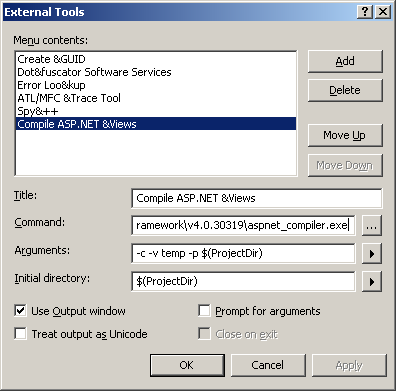
  • Go to Visual Studio Tools menu, and click on External Tools
  • Enter a title and consider adding a shortcut. I am using Compile ASP.NET &Views and I just use the short cut ALT+T+V to run it.
  • Enter the ASP.NET compiler command. For .NET 4, it is C:\WINDOWS\Microsoft.NET\Framework\v4.0.30319\aspnet_compiler.exe.
  • Add the following arguments: -c -v temp -p $(ProjectDir)  -  (option -c forces a full rebuild; option -v defines the virtual path of the application to be compiled, if you use temp, it will be in C:\WINDOWS\Microsoft.NET\Framework\v4.0.30319\Temporary ASP.NET Files\temp; option -p defines the physical path of the application to be compiled, by using $(ProjectDir), it will compile the views of the current project in Visual Studio).
  • Enter the initial directory: $(ProjectDir)
  • I use the output window, which makes easier if you have errors and want to open the file with errors by double clicking on it.
  • Press OK and you are all set. Just make sure to run this command when you are in your ASP.NET web project, or selecting or editing any of its files.
Alternately, you could import the following registry key:

[HKEY_LOCAL_MACHINE\SOFTWARE\Microsoft\VisualStudio\10.0\External Tools\Compile ASP.NET &Views]
"ToolCmd"="C:\\WINDOWS\\Microsoft.NET\\Framework\\v4.0.30319\\aspnet_compiler.exe"
"ToolDir"="$(ProjectDir)"
"ToolArg"="-c -v temp -p $(ProjectDir)"
"ToolOpt"=dword:00000018

One advantage of using the aspnet_compiler.exe as external tool is to be able to continue work on Visual Studio 2010 while watching the results in the output window. This is way better than using MvcBuildViews in developers build since Visual Studio 2010 hangs and display that annoying message that it is busy.

Happy building!

Tuesday, August 23, 2011

Managing Transactions with Entity Framework 4

The Entity Framework already supports native database transactions. When using the ObjectContext.SaveChanges method, it already operates within a database transaction. If any dirty ObjectStateEntry object cannot be persisted, then ObjectContext.SaveChanges will roll back the transaction and throw an exception. So, if you are working with only one object context then you have already built-in support for database transactions when using the ObjectContext.SaveChanges method.

However, there are other complex scenarios where you want to update a record in a database and add an entry to a message queue; or add, update, or delete records in different databases. In this situation, if you need these operations to be ACID, then you will need a distributed transaction that spans multiple databases and systems. A distributed transaction is a kind of transaction that requires the enlistment of additional resource managers.

If you have a complex persistence scenario as mentioned above, then you can use the TransactionScope class. This class uses the Microsoft Distributed Transaction Coordinator (MSDTC or DTC) which is a Windows service that coordinate transactions over different resource managers across multiple computers. Using MSDTC is an expensive task, however TransactionScope only uses MSDTC if it is necessary. If multiple instances of ObjectContext connect to the same database, then it uses a standard database transaction (SqlTransaction, OleDbTransaction). If there are multiple databases to be connected, then the transaction is promoted to MSDTC. If you are using SQL Server, transaction promotions in SQL Server 2008 happens less frequently than in SQL Server 2005, so SQL Server 2008 is more efficient in this matter. You can use the SQL Profiler tool to monitor how many transactions are promoted to MSDTC.

When using TransactionScope with multiple instances of ObjectContext, you should not use the parameterless ObjectContext.SaveChanges() method. Instead, you should use the ObjectContext.SaveChanges(SaveOptions) method and pass SaveOptions.DetectChangesBeforeSave. The reason is to maintain the ObjectContext state if something fails, otherwise the ObjectContext will be in a bad state, i.e., thinking that the changes were successfully committed when they were actually rolled back. When all operations within the transaction are successfully completed, then you should call the TransactionScope.Complete method, and after that it is safe to call ObjectContext.AcceptAllChanges().

Below you can see an example based on this post, but using the SaveChanges(SaveOptions) method instead of the obsolete SaveOptions(Boolean):

using (TransactionScope scope = new TransactionScope())
{
    // Save changes but maintain context1 current state.
    context1.SaveChanges(SaveOptions.DetectChangesBeforeSave);

    // Save changes but maintain context2 current state.
    context2.SaveChanges(SaveOptions.DetectChangesBeforeSave);

    // Commit succeeded since we got here, then completes the transaction.
    scope.Complete();

    // Now it is safe to update context state.
    context1.AcceptAllChanges();
    context2.AcceptAllChanges();
}

That is, the example above updates two databases within a distributed transaction and ObjectContext instances are only updated if the transaction is successfully committed. For an example of a transaction fail-retry scenario and using a database and a message queue, see the following link: http://msdn.microsoft.com/en-us/library/bb738523.aspx

Monday, May 24, 2010

MVC Music Store and Chinook Database

The MVC Music Store is a sample application built on ASP.NET MVC Framework 2. It includes the source code and a tutorial explaining the steps to build it. This is a great tutorial if you want to get started on ASP.NET MVC 2. When I looked at the documentation, I noticed that the data used by the application is very familiar. Jon Galloway, the author, mentioned on this post that the MVC Music Store data is based on the Chinook Database. The Chinook Database was built using my iTunes library as sample data, and that is why I recognized some particular artists and albums: a mix of rock, heavy metal, classical music and Brazilian music.
As to the Chinook Database I have a list of improvements to be done and need to get sometime to work on a new release. I am also thinking about adding support to document-oriented databases such as Raven DB and MongoDB.

Wednesday, May 20, 2009

Visual Studio 2010 and .NET 4 Beta 1

Visual Studio 2010 and .NET 4 Beta 1 is available today for the general public. Note that the new .NET version is 4 and not 4.0. You can download the beta from here.

Also, check out Jason Zander's post where he highlights the new functionalities, and Brad Adams post with .NET 4 poster.

I am currently preparing a virtual machine with Windows 7 RC 1 and VS 2010 for trying out the new features.

Spring Boot Configuration Properties Localization

Spring Boot allows to externalize application configuration by using properties files or YAML files. Spring Profiles  provide a way to segr...